Icebound Secrets Hidden Object
- 4.4
- Rating
- 500.00K
- Installs
- Free
- Price

 Analysis by App-foxy
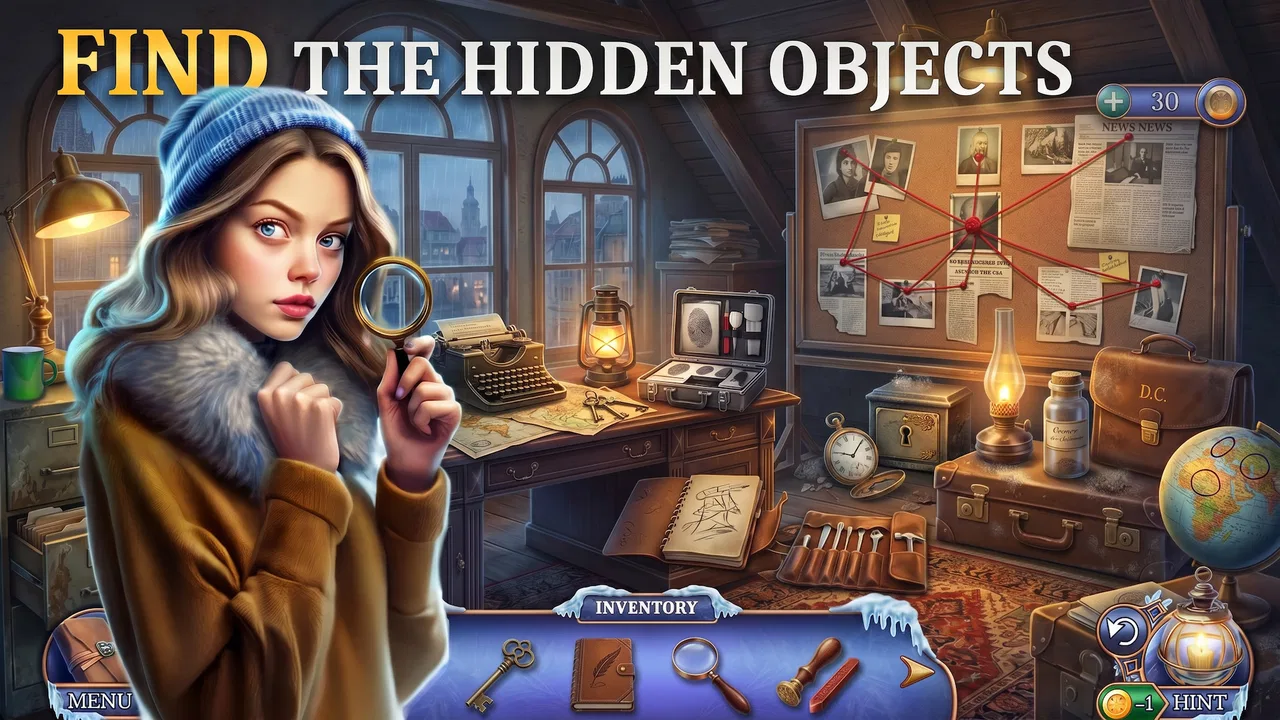
I approached Icebound Secrets Hidden Object as a quiet mystery game rather than a fast adventure title. Its basic idea is simple: investigate unresolved cases by searching illustrated scenes for concealed objects and using what you find to move the investigation forward. That makes it easy to understand within a few minutes, but the real question is whether the searching stays comfortable and satisfying over longer sessions.
My overall impression is positive, especially for players who enjoy detective stories at their own pace. The game is free to start, belongs to the adventure category, and comes from Crooto Software. It has built a sizeable audience, with more than 500 thousand installs and an average rating of 4.3 from roughly 7 thousand ratings. Those figures suggest that the central hidden-object formula is connecting with many players, although they do not remove the need to consider how the visual searching works for different people.
How the visual investigation feels to play
I focus here on the part that defines the experience: searching a scene carefully enough to turn visual details into progress on a mystery. That makes the game less about quick reactions and more about how well its artwork rewards a patient, organized look. With that in mind, the next section considers what this kind of investigation feels like moment to moment.
You May Also Like

 Blood Strike: 2.5 Anniversary
Blood Strike’s Loadouts Turn Every Drop Into a Tactical Gamble
A close look at Blood Strike’s custom loadouts: how fast access to signature weapons reshapes its battle royale rhythm, rewards preparation, and narrows the gap between fights.

 Pandora - Music & Podcasts
Pandora’s Music Is Easy to Start, but Harder to Recover
Pandora’s strength is its low-effort path from a seed to a station. Its weak spot is how much confidence it asks you to place in connection, setup, and quiet recovery.

 8 Ball Pool
 Is Built on Rivalries, Rematches, and Routine
A close look at the rivalries, rematches, shared routines, and unanswered safety questions that turn a quick pool match into a persistent mobile community.

 Samsung Music
’s Quiet Strength Is Playing What You Already Own
Its reach comes less from spectacle than from dependable access to a personal library. That simplicity is both the app’s strongest retention engine and its ceiling.

 AccuWeather: Weather Radar
AccuWeather Review: A Quick, Clear Forecast for Everyday Decisions
For everyday plans, the best forecast is the one you can understand quickly. AccuWeather makes rain timing, radar, and local conditions easy to act on, with a few trade-offs.

 Hill Climb Racing
Why Hill Climb Racing Still Turns Crashes Into One More Run
A tiny car, a bumpy hill and one more upgrade: Hill Climb Racing keeps resurfacing because its simple chaos makes every near-miss feel personal.
More From Our News Desk
View All News


Readability matters more than speed
The main challenge is not reflexes. It is visual attention. Each scene asks me to slow down, scan details, compare shapes, and notice objects that blend into their surroundings. That makes the experience approachable for anyone who prefers deliberate play, but it also means that the quality of the visual presentation has a direct effect on enjoyment. When the target blends into a busy background, the task can feel like genuine detective work. When the distinction is too subtle, it can feel more like hunting for a single pixel.
I found it useful to divide every scene into zones instead of sweeping my eyes randomly across the screen. I usually start at the edges, move across the largest objects, and then return to small decorative areas. This is more than a personal habit: it prevents repeated tapping in the same places and makes the search easier to pause and resume. If you are playing on a small phone, holding it slightly farther away can also help you see the whole composition before focusing on individual details.
The game’s appeal comes from this close inspection. It is a good fit for a player who likes visual puzzles, atmospheric detective work, and the small satisfaction of recognizing something that was visible all along. It is less suitable for someone who wants constant movement, combat, or a story that advances without asking for repeated observation.
Navigation is simple, but attention still has a cost
Hidden-object games often look effortless from the outside because the controls are usually limited to taps. That does not mean they are effortless for every player. The important interaction here is accurate selection: I need to touch the object I believe I have found, and a near miss can interrupt the rhythm. On a larger screen, that kind of interaction feels comfortable. On a compact phone, crowded scenes can make the same action more demanding.
For everyday use, I would play with the device resting on a surface rather than holding it in one hand. That reduces wrist strain and makes deliberate tapping easier. It also helps when I want to compare two parts of a scene without constantly shifting the phone. A stylus or other pointing accessory may be useful for some players, but I would treat that as a personal setup choice rather than something required by the game.
One practical strength is that the game does not demand the same physical tempo as an action adventure. I can stop to inspect a corner, think about a clue, or take a short break without feeling that I have missed a rapidly changing event. That slower pace makes it suitable for a quiet evening, a commute with a stable seat, or a few minutes while waiting for an appointment.
Supporting different visual preferences
Players who have strong visual acuity will probably get the most immediate pleasure from the detailed scenes. For others, the experience may depend heavily on screen size, brightness, and personal tolerance for visual clutter. I recommend testing the game on the device where you intend to play rather than assuming that a comfortable experience on a tablet will feel the same on a phone.
Increasing the device’s text size may help with surrounding interface elements, but it will not necessarily enlarge the hidden objects inside the artwork. That distinction is important. A larger system font can make menus easier to read while leaving the core search task unchanged. If you regularly struggle to distinguish small shapes or low-contrast details, the game may become tiring even though the controls themselves are straightforward.
I also prefer playing in a room with even lighting. Glare across the display makes subtle objects harder to see, and a very dark room can make a long search session uncomfortable. These are simple adjustments, but they change the experience more than I expected. The game is visually focused, so the surrounding environment becomes part of the accessibility equation.
Motor and sensory considerations
From a motor perspective, the game is gentler than titles built around rapid swipes or precise timing. Most of the work is tapping and inspecting, so players who avoid fast action may find it welcoming. Still, repeated taps can become tiring if a scene requires many attempts, particularly for anyone with limited fine-motor control or hand fatigue.
My best approach is to avoid frantic tapping. I first identify the object, place the phone securely, and then tap once with intention. This reduces accidental selections and keeps the session calmer. If your hands become uncomfortable, short sessions are more practical than trying to complete a long stretch in one sitting. The game’s investigative structure works well with that stop-and-start routine.
Sensory comfort is more individual. The win condition comes from visual discovery, so players who are sensitive to dense images may need more breaks than players who enjoy examining elaborate scenes. I would not choose this as a background game while watching television, because divided attention makes the search slower and less rewarding. It asks for quiet concentration even when the physical controls are minimal.
Sound can also influence how pleasant the experience feels, but I would not rely on audio to understand the investigation. The core information is presented visually through the scenes and the objects being found. That makes the game workable in places where sound is inconvenient, such as a waiting room or shared bedroom, provided the player is comfortable with the visual demands.
Useful ways to play in real situations
A realistic use case is a short evening session after work. I can sit down with a drink, investigate a scene, and stop when my attention begins to fade. Unlike a competitive game, there is no pressure to maintain a team’s progress or react to another player. That makes it a good choice for someone who wants a contained mental activity rather than another social obligation.
It can also work during travel, but only when the device is stable and the lighting is reasonable. On a moving bus, small targets become harder to select, and changing reflections can make detailed scenes uncomfortable. A tablet may be preferable for travel because the larger display gives the artwork more room, though it is less convenient to carry. I would not recommend starting a difficult search while walking or multitasking; the game rewards attention and safe device use.
For family play, the mystery format can encourage two people to search together, with one person describing an area and the other making the tap. That can reduce the motor burden for a player who finds repeated tapping difficult. It also turns the game into a shared observation activity. The Teen content rating is worth keeping in mind for households choosing games for younger players, so I would check whether the intended player is comfortable with its mystery-oriented presentation.
Where it differs from other adventure choices
Compared with a conventional action adventure, this game removes combat, platforming, and rapid navigation from the center of the experience. The reward comes from noticing details and resolving cases. That is its strongest point for patient players and its clearest weakness for anyone who needs constant change.
Compared with a traditional puzzle game, the challenge is less about logic grids or abstract rules and more about visual recognition. You are not only asking, “What is the correct answer?” You are asking, “Where is the relevant thing hidden in this scene?” Players who enjoy detective fiction but do not want demanding calculations may find that balance appealing.
Compared with a physical puzzle book, the game offers a more directed investigative setting and the convenience of carrying the activity on a phone. The trade-off is that screen comfort becomes important, and the free model includes optional purchases ranging from 99 cents to $42.99 per item. I would begin without buying anything and decide only after I knew whether the search loop genuinely suited me.
Progress, patience, and spending decisions
The free entry point is helpful because hidden-object games are very personal. Some players love scanning the same kind of scene repeatedly, while others lose interest quickly. Being able to try the basic experience before spending money lowers that risk. At the same time, optional purchases can change how freely a player approaches difficult moments, so I would set a personal spending limit before getting deeply invested.
My advice is to treat hints or paid assistance as a last resort rather than the first response to frustration. Before using help, I revisit the scene with a systematic pattern, check the object list carefully, and look for unusual placements near large background elements. This preserves the satisfaction of solving the case and makes it easier to tell whether I am stuck because of reasoning or because the visual detail is genuinely difficult to distinguish.
There is also a useful trade-off between accuracy and speed. Rushing may feel efficient, but it leads to missed objects and unnecessary taps. A slower search often saves time overall. I find that especially important for players with visual or motor limitations, because a calm method reduces the number of corrective actions required.
Remaining barriers to keep in mind
The largest barrier is visual density. A player may understand every instruction and still struggle because the target is small, partially camouflaged, or surrounded by similar colors and textures. That is not a problem solved by knowing the rules. It is a direct consequence of the hidden-object format, and it can make the game unsuitable for people who need strong contrast, large targets, or minimal visual clutter.
Another barrier is the need for repeated touch accuracy. The game is less physically intense than an action title, but it is not completely hands-off. Players with tremors, limited reach, or difficulty maintaining a steady grip may need to rest the phone on a table or play with another person. Those workarounds can help, but they may not make every scene equally comfortable.
Attention is another consideration. The game’s slow pace is an advantage for some players, but the search can become mentally tiring when a scene contains many competing details. I would not describe it as a passive relaxation app. It is quiet, yet it still asks me to maintain concentration. Shorter sessions are likely to be more enjoyable than forcing myself to continue after the visual information starts to blur together.
Device choice matters as well. A phone is convenient, but a smaller screen gives less room for distinguishing objects. A tablet can improve the viewing experience while reducing portability. If you are choosing between this and a text-heavy mystery game, the better option depends on whether you prefer inspecting images or reading and reasoning through written clues.
Who should try it, and who should skip it
I would recommend it to players who enjoy hidden-object investigations, calm detective stories, and games that can be played without fast reactions. It is particularly appealing if you like noticing environmental details and solving a case through a sequence of small discoveries. The free price makes it easy to test, and the current version, 6.17.2, is available for devices running at least Android 10 or an equivalent supported mobile environment.
I would be more cautious if you have difficulty with small visual targets, dislike crowded illustrations, or want a game that can be enjoyed while your attention is elsewhere. I would also skip it if optional purchases make you uncomfortable in free-to-play games, even though trying the game itself costs nothing. Players seeking action, multiplayer competition, or a short linear story will probably find a different adventure format more satisfying.
The Teen age rating also makes it a better fit for older players than for very young children. A parent choosing a game for a child should consider not only the rating but also the visual-search demands and the possibility of optional purchases. For a teenager or adult who enjoys mysteries, those same qualities may be part of the appeal.
My inclusive verdict
After spending time with it, I see Icebound Secrets as a focused visual investigation game with a clear audience. Its strongest quality is the way it turns observation into the main form of progress. I can play slowly, stop between scenes, and use a repeatable search method instead of relying on reflexes. That makes it more accommodating than many adventure games for players who prefer controlled, low-pressure interaction.
Its limitations are equally clear. The experience depends on seeing small details, tapping them accurately, and staying focused on busy artwork. No amount of enthusiasm for the mystery can fully remove those demands. Players with visual fatigue or motor difficulties may need a larger screen, a stable playing position, frequent breaks, or help from another person. Those adjustments can improve access, but they are practical compromises rather than guarantees of comfort.
For me, the right way to approach it is as a flexible, short-session mystery game rather than an endlessly absorbing adventure. Start free, play in good lighting, search methodically, and avoid spending until you know the visual style works for you. Crooto Software has created something that should appeal to patient clue hunters, while players who need large, high-contrast targets or faster variety may be better served elsewhere. If careful observation is what makes a game enjoyable for you, this is worth trying; if visual searching feels like work, its central mechanic will remain a barrier.
FAQs for Icebound Secrets Hidden Object
01What is Icebound Secrets Hidden Object about?
Icebound Secrets Hidden Object is a captivating puzzle game where players must uncover hidden objects within beautifully illustrated scenes. Set in a mysterious, frozen world, the game challenges your observation skills and attention to detail as you unravel the secrets buried beneath the ice. Each level presents unique puzzles and intriguing storylines.
02Is Icebound Secrets Hidden Object free to play?
Yes, Icebound Secrets Hidden Object is free to download and play. However, it may offer in-app purchases for players who wish to enhance their gaming experience. These purchases can include hints, additional levels, or special items. Always check the in-app purchase options if you prefer to avoid extra costs.
03What are the key features of Icebound Secrets Hidden Object?
The game offers stunning graphics, immersive soundtracks, and a rich storyline. Players can enjoy a variety of levels, each with unique challenges and hidden objects to find. Additional features include daily challenges, achievements, and the ability to compete with friends on leaderboards. It’s designed to keep players engaged and entertained.
04Can I play Icebound Secrets Hidden Object offline?
Yes, Icebound Secrets Hidden Object can be played offline, allowing players to enjoy the game without a constant internet connection. This makes it a great option for gaming on the go, whether you’re traveling or in an area with limited connectivity. However, some features like leaderboards may require an internet connection.
05What devices are compatible with Icebound Secrets Hidden Object?
Icebound Secrets Hidden Object is available for both Android and iOS platforms. It is compatible with most smartphones and tablets running on recent operating systems. Ensure your device meets the minimum requirements for seamless gameplay. Check the app store listings for specific compatibility details before downloading.
Pros
- Engaging storyline with mysterious twists.
- Stunning graphics enhance the immersive experience.
- Challenging puzzles keep players entertained.
- Variety of levels with increasing difficulty.
- User-friendly interface for easy navigation.
Cons
- Limited hints can frustrate some players.
- Occasional in-game ads disrupt gameplay.
- Some puzzles may feel repetitive over time.
- Requires internet connection to play.
- In-app purchases can be costly.

Icebound Secrets Hidden Object
Gallery